




Hello, Buster Commanders! 🐾
Ever wondered, "Where do I enter the coupon codes I received from events?"
To make sure you don't miss out on any rewards,
we’ve put together a quick guide on how to redeem your coupons and some important things to keep in mind!
Check the details below and claim your rewards! 🎁✨
🎟️ How to Redeem Your Coupons
[AOS]
1. Launch the game and tap the [Settings] button (gear icon) in the top right corner.
2. Copy your Account ID and tap the [Coupon] button.
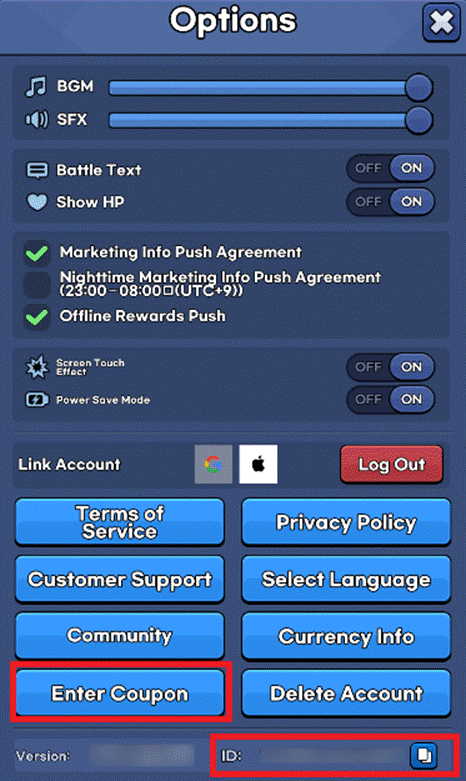
3. Enter your coupon code on the redemption page.
4. Your rewards will be sent directly to your in-game Mailbox.
[iOS]
1. Visit the official Animal Busters Coupon Redemption website.
▶ [Animal Busters Coupon Site]
2. Enter your Account ID and the Coupon Code on the page.
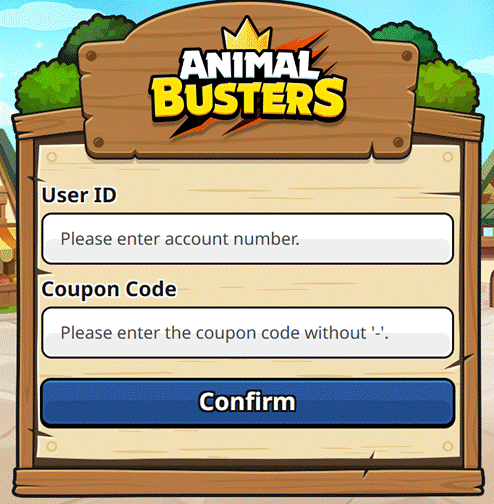
3. Once completed, your rewards will be sent to your in-game Mailbox.
📌 Please Read Before Redeeming!
※ Your Account ID can be found in the [Settings] menu after logging in.
※ Coupons that have already been used cannot be redeemed again.
※ Rewards will be sent to your Mailbox once the coupon is successfully registered.
※ Some coupons have an expiration date and cannot be used after they expire.
※ In some cases, there might be a slight delay in receiving rewards.
※ If you don’t see your rewards immediately, please try restarting the game.
※ If you have successfully registered a coupon but haven’t received the reward after some time, please contact Customer Support.
❓ Having Trouble? Check This List
If you're unable to redeem your coupon, please check the following
※ Did you enter the correct case-sensitive letters and numbers?
※ Has the coupon expired?
※ Have you already used this coupon code on this account?
Make sure to grab your rewards and enjoy your adventure! 🎁
Thank you.

Move to the Login page?
Move to the login page?
두줄일떄 텍스트
등록한 상품 바로가기(링크)두줄일떄 텍스트
등록한 상품 바로가기(링크)두줄일떄 텍스트
등록한 상품 바로가기(링크)Your Game ID (NID) can be found in your game profile or settings.